> ## Documentation Index
> Fetch the complete documentation index at: https://hastekit.ai/docs/llms.txt
> Use this file to discover all available pages before exploring further.
# API Servers
> Import an OpenAPI 3.x spec — every operation becomes an agent tool, HTTP requests handled for you
You already document your internal APIs with OpenAPI. **API Servers** lets HasteKit consume that spec directly: register the server once, and every operation in the spec becomes a tool your agents can call. No MCP server to write, no glue code.
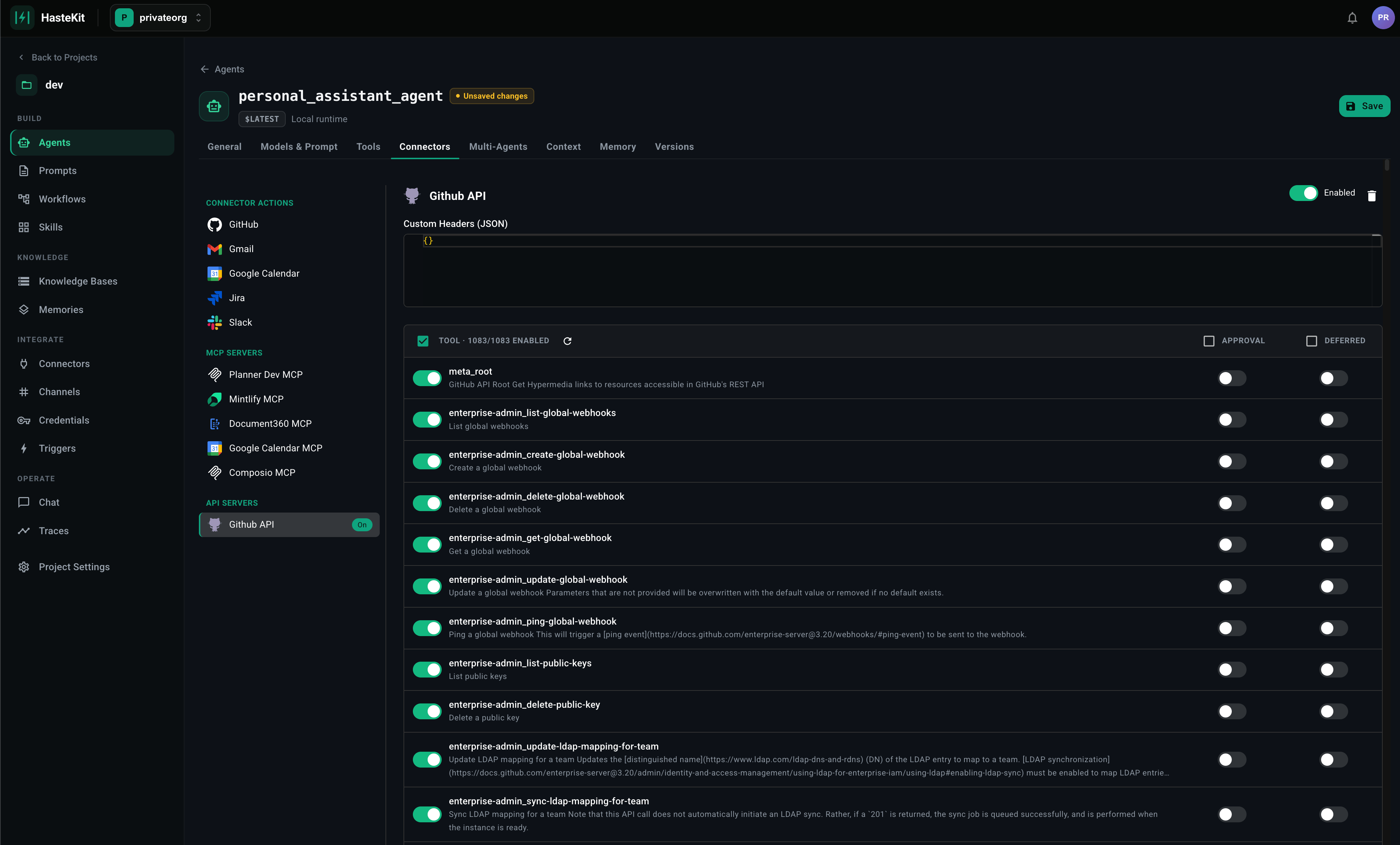 ## Registering an API server
1. Open **Agent Framework → API Servers** (or attach a new one inline from the agent's Tools tab).
2. Provide:
| Field | Description |
| ------------------ | -------------------------------------------------------------------------------------------------------------------------------------- |
| **Name** | Used as a namespace prefix on the generated tool names (e.g. `billing.create_invoice`). |
| **OpenAPI Spec** | Paste the YAML/JSON directly, or provide a URL HasteKit can fetch. OpenAPI 3.x. |
| **Base URL** | Where the live API lives. Used at call time. |
| **Authentication** | Optional. Static headers (e.g. `Authorization: Bearer …`) or a reference to a stored [credential](/docs/gateway/agent-builder/credentials). |
3. Save. HasteKit parses the spec; every operation becomes an available tool with the parameters and response schema described by the spec.
## What gets generated
For each operation:
* **Tool name** — derived from `operationId` (falling back to method + path).
* **Description** — from the operation's `summary` / `description`.
* **Parameters** — path params, query params, and request body are all flattened into the tool's input schema. Required vs optional is preserved.
* **Response** — returned to the agent as a JSON object (or string for non-JSON responses).
Schema fidelity is high — `oneOf`, `enum`, format hints, and required fields are all preserved on the tool input schema, so the model's tool call is constrained the same way a typed client would be.
## Attaching to an agent
1. Open the agent → **Tools** tab → **API Servers** section.
2. Select the registered server.
3. Optionally filter which operations are exposed (you rarely want all 200 of an internal API).
4. Optionally flag specific operations as **Requires Approval** (gates mutating calls behind a human) or **Deferred** (keeps them out of the prompt until the agent asks).
5. Save.
## When to use API Servers vs alternatives
| You have | Use |
| -------------------------------------------- | ----------------------------------------------------------------------- |
| An OpenAPI 3.x spec for an HTTP API | **API Servers** |
| A third-party OAuth app (Gmail, Slack, etc.) | [Connectors](/docs/gateway/agent-builder/connectors) |
| An MCP-speaking process | [MCP Servers](/docs/gateway/agent-builder/mcp-server) |
| Bespoke code | [Function tools](/docs/hastekit-sdk/agents/tools/function-tools) via the SDK |
## Registering an API server
1. Open **Agent Framework → API Servers** (or attach a new one inline from the agent's Tools tab).
2. Provide:
| Field | Description |
| ------------------ | -------------------------------------------------------------------------------------------------------------------------------------- |
| **Name** | Used as a namespace prefix on the generated tool names (e.g. `billing.create_invoice`). |
| **OpenAPI Spec** | Paste the YAML/JSON directly, or provide a URL HasteKit can fetch. OpenAPI 3.x. |
| **Base URL** | Where the live API lives. Used at call time. |
| **Authentication** | Optional. Static headers (e.g. `Authorization: Bearer …`) or a reference to a stored [credential](/docs/gateway/agent-builder/credentials). |
3. Save. HasteKit parses the spec; every operation becomes an available tool with the parameters and response schema described by the spec.
## What gets generated
For each operation:
* **Tool name** — derived from `operationId` (falling back to method + path).
* **Description** — from the operation's `summary` / `description`.
* **Parameters** — path params, query params, and request body are all flattened into the tool's input schema. Required vs optional is preserved.
* **Response** — returned to the agent as a JSON object (or string for non-JSON responses).
Schema fidelity is high — `oneOf`, `enum`, format hints, and required fields are all preserved on the tool input schema, so the model's tool call is constrained the same way a typed client would be.
## Attaching to an agent
1. Open the agent → **Tools** tab → **API Servers** section.
2. Select the registered server.
3. Optionally filter which operations are exposed (you rarely want all 200 of an internal API).
4. Optionally flag specific operations as **Requires Approval** (gates mutating calls behind a human) or **Deferred** (keeps them out of the prompt until the agent asks).
5. Save.
## When to use API Servers vs alternatives
| You have | Use |
| -------------------------------------------- | ----------------------------------------------------------------------- |
| An OpenAPI 3.x spec for an HTTP API | **API Servers** |
| A third-party OAuth app (Gmail, Slack, etc.) | [Connectors](/docs/gateway/agent-builder/connectors) |
| An MCP-speaking process | [MCP Servers](/docs/gateway/agent-builder/mcp-server) |
| Bespoke code | [Function tools](/docs/hastekit-sdk/agents/tools/function-tools) via the SDK |