> ## Documentation Index
> Fetch the complete documentation index at: https://hastekit.ai/docs/llms.txt
> Use this file to discover all available pages before exploring further.
# Human in the Loop
> Gate any tool call behind a human approval step
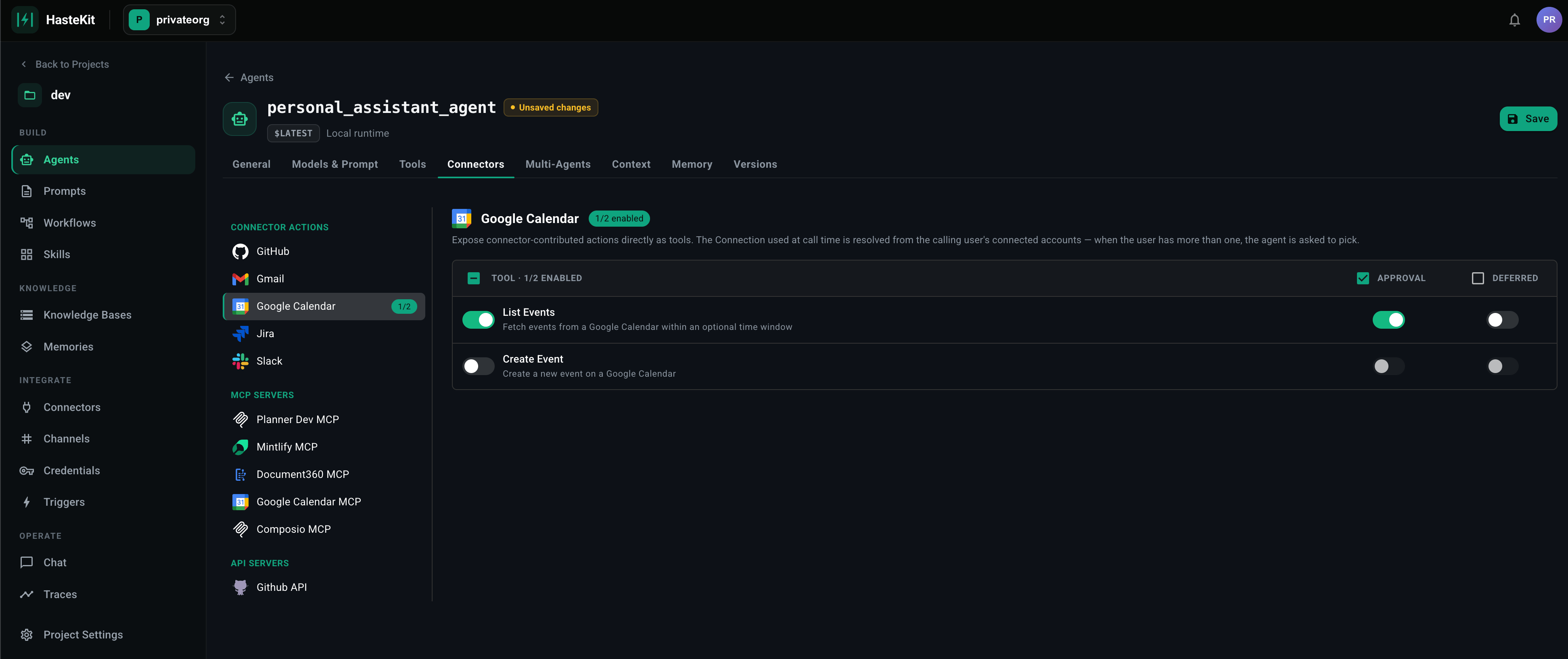
Some tool calls shouldn't go through unsupervised — sending email, posting to Slack, transitioning a Jira ticket, deleting a record. Marking a tool as **Requires Approval** pauses the agent before the call executes and waits for a human to approve or deny.
 ## What can be gated
Approval is a per-tool flag, available on **every tool type**:
* [Provider Tools](/docs/gateway/agent-builder/provider-tools) — image, speech, web search, code, sandbox, todo, schedule.
* [MCP Servers](/docs/gateway/agent-builder/mcp-server) — pick which tool names require approval in the **Tools Requiring Approval** field.
* [API Servers](/docs/gateway/agent-builder/api-servers) — flag specific operations.
* [Connectors](/docs/gateway/agent-builder/connectors) — flag specific actions (e.g. `Gmail.Send` but not `Gmail.List`).
* [Agent as a Tool](/docs/gateway/agent-builder/agent-tool) — gate sub-agent invocations.
* [Workflows](/docs/gateway/agent-builder/workflows) — gate workflow-as-tool calls.
## How it works at runtime
1. The model decides to call a tool. The runtime sees the tool is marked **Requires Approval**.
2. The agent run **pauses**. A pending approval is created with the tool name, arguments, and the run/conversation it belongs to.
3. A human reviewer sees the pending call (in the UI, in a notification, or via the API) with full context.
4. The reviewer **approves** or **denies**.
5. On approval, the tool executes and the agent resumes. On denial, the agent receives an error result and continues — usually choosing a different path.
## Why this works on durable runtimes
Approval pauses can last seconds, minutes, or hours. On the [Local runtime](/docs/gateway/agent-builder/agent-runtime), the request is held open and the process pays for the wait. On the **Temporal** or **Restate** runtime, the workflow sleeps without holding compute — the run just stays in a "waiting for approval" state and resumes when the decision arrives. For anything beyond seconds of wait time, a durable runtime is strongly recommended.
## Approve from anywhere
Approvals can be acted on from:
* The HasteKit dashboard.
* A [channel](/docs/gateway/agent-builder/channels) (e.g. a Slack message with Approve / Deny buttons).
* The HTTP API (`/approvals/` endpoints).
## Good defaults
A pragmatic policy for production agents:
* **Read operations** — never require approval. (`list_messages`, `get_issue`, `search_code`.)
* **Write operations on the user's own data** — require approval if the agent is autonomous; skip approval if the user explicitly asked.
* **Write operations on shared / external systems** — always require approval. (`send`, `delete`, `transition`, `merge`.)
* **Money-moving operations** — always require approval. No exceptions.
## What can be gated
Approval is a per-tool flag, available on **every tool type**:
* [Provider Tools](/docs/gateway/agent-builder/provider-tools) — image, speech, web search, code, sandbox, todo, schedule.
* [MCP Servers](/docs/gateway/agent-builder/mcp-server) — pick which tool names require approval in the **Tools Requiring Approval** field.
* [API Servers](/docs/gateway/agent-builder/api-servers) — flag specific operations.
* [Connectors](/docs/gateway/agent-builder/connectors) — flag specific actions (e.g. `Gmail.Send` but not `Gmail.List`).
* [Agent as a Tool](/docs/gateway/agent-builder/agent-tool) — gate sub-agent invocations.
* [Workflows](/docs/gateway/agent-builder/workflows) — gate workflow-as-tool calls.
## How it works at runtime
1. The model decides to call a tool. The runtime sees the tool is marked **Requires Approval**.
2. The agent run **pauses**. A pending approval is created with the tool name, arguments, and the run/conversation it belongs to.
3. A human reviewer sees the pending call (in the UI, in a notification, or via the API) with full context.
4. The reviewer **approves** or **denies**.
5. On approval, the tool executes and the agent resumes. On denial, the agent receives an error result and continues — usually choosing a different path.
## Why this works on durable runtimes
Approval pauses can last seconds, minutes, or hours. On the [Local runtime](/docs/gateway/agent-builder/agent-runtime), the request is held open and the process pays for the wait. On the **Temporal** or **Restate** runtime, the workflow sleeps without holding compute — the run just stays in a "waiting for approval" state and resumes when the decision arrives. For anything beyond seconds of wait time, a durable runtime is strongly recommended.
## Approve from anywhere
Approvals can be acted on from:
* The HasteKit dashboard.
* A [channel](/docs/gateway/agent-builder/channels) (e.g. a Slack message with Approve / Deny buttons).
* The HTTP API (`/approvals/` endpoints).
## Good defaults
A pragmatic policy for production agents:
* **Read operations** — never require approval. (`list_messages`, `get_issue`, `search_code`.)
* **Write operations on the user's own data** — require approval if the agent is autonomous; skip approval if the user explicitly asked.
* **Write operations on shared / external systems** — always require approval. (`send`, `delete`, `transition`, `merge`.)
* **Money-moving operations** — always require approval. No exceptions.