> ## Documentation Index
> Fetch the complete documentation index at: https://hastekit.ai/docs/llms.txt
> Use this file to discover all available pages before exploring further.
# Provider Tools
> Built-in tools — image generation, speech, transcription, web search, code execution — wired straight into the agent
Provider tools are first-class capabilities that ship with HasteKit. Toggle them on in the **Tools** tab and the agent gets a new tool — no MCP server, no OpenAPI spec, no custom code. Each tool has independent **Enabled**, **Requires Approval**, and **Deferred** switches.
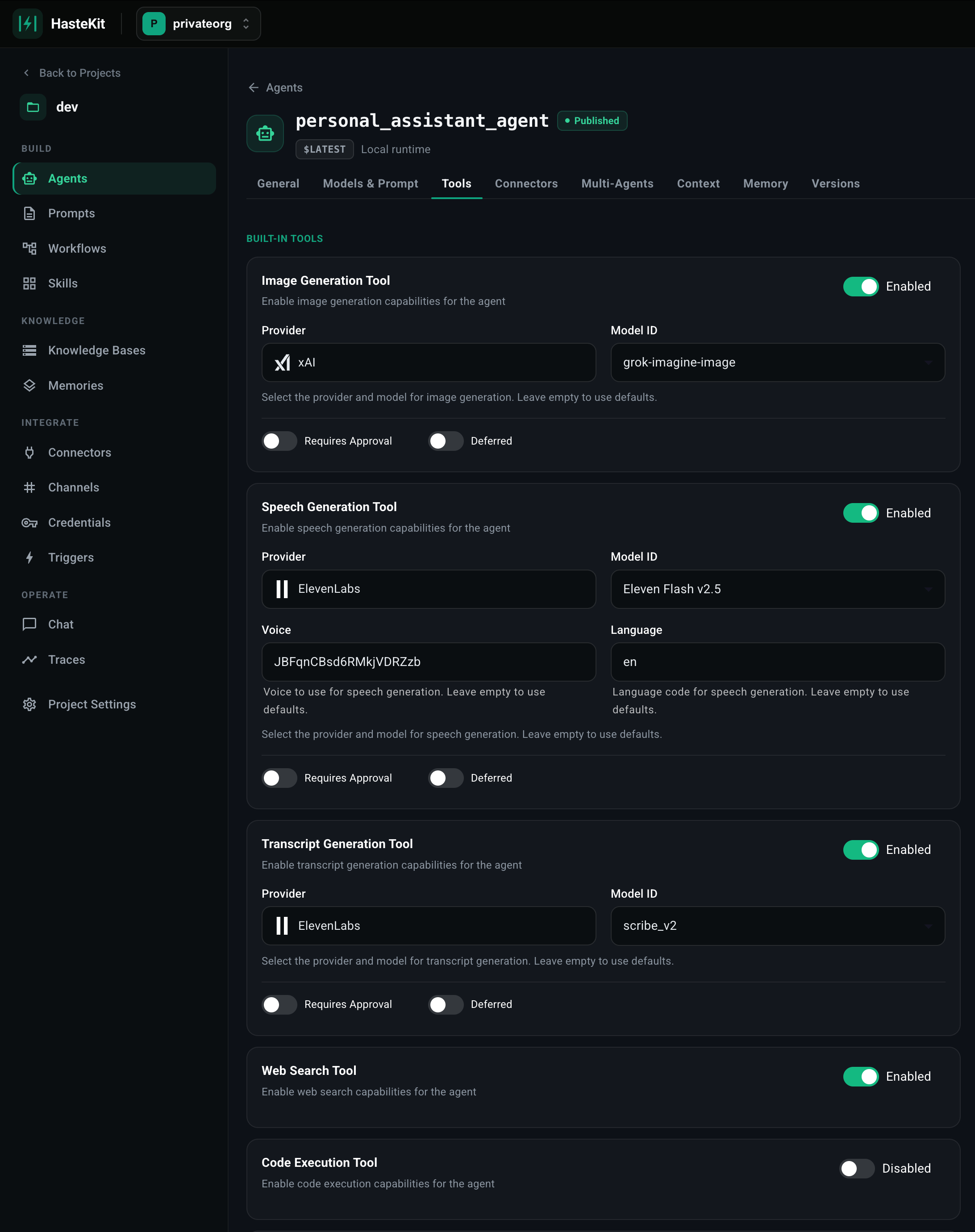 ## Available tools
| Tool | What it does | Configurable |
| ------------------------------- | ------------------------------------------------------------------------------------------------------ | ------------------------------------------------------------------------- |
| **Image Generation** | Generate images from text prompts. | Provider + model (e.g. `xAI grok-imagine`, `OpenAI gpt-image-1`). |
| **Speech Generation (TTS)** | Synthesize speech from text. | Provider + model + voice + language (e.g. `ElevenLabs Flash v2.5`). |
| **Transcript Generation (STT)** | Transcribe audio to text. | Provider + model (e.g. `ElevenLabs scribe_v2`). |
| **Web Search** | Search the web for real-time information. | None — uses the provider's native search. |
| **Code Execution** | Run code in the provider's sandboxed code interpreter. | None. |
| **Todo Tool** | A built-in todo list the agent uses to plan and track multi-step tasks. | None. |
| **Schedule Task Tool** | Lets the agent schedule itself for later — recurring (cron) or one-off — and amend existing schedules. | None. |
| **Sandbox Tool** | Per-session Docker-backed bash sandbox with persistent workspace and file API. | Image, env vars. See [Sandbox Tool](/docs/gateway/agent-builder/sandbox-tool). |
## Enabling tools
1. Open your agent in the Agent Builder.
2. Click the **Tools** tab.
3. Toggle the tool on. Image / Speech / Transcript tools also let you pick the provider and model.
4. Optionally flip the **Requires Approval** switch to gate each tool call behind [human-in-the-loop](/docs/gateway/agent-builder/human-in-the-loop) confirmation.
5. Optionally flip **Deferred** to keep the tool definition out of the prompt until the agent explicitly asks for it (useful for big tool catalogs).
6. Save.
## Image / Speech / Transcription
These three are configured similarly: pick a provider, pick a model, and (for speech) a voice and language. The agent receives a single tool — e.g. `generate_image(prompt)`, `generate_speech(text)`, `transcribe(audio_url)` — and the runtime routes the call to the configured provider behind the scenes.
You can use any combination of providers for the three tools — e.g. xAI for images and ElevenLabs for speech.
## Web Search & Code Execution
These map onto the LLM provider's native capabilities. Compatibility depends on the model you pick on the Model tab.
| Tool | OpenAI | Anthropic | Gemini |
| -------------- | ------ | --------- | ------ |
| Web Search | ✅ | ✅ | — |
| Code Execution | ✅ | ✅ | ✅ |
For richer or stricter sandboxing — or to give the agent a persistent workspace — use the [Sandbox Tool](/docs/gateway/agent-builder/sandbox-tool) instead of provider-level code execution.
## Todo & Schedule
Two utility tools designed for long-running, agentic workflows:
* **Todo Tool** — gives the agent `add_todo`, `update_todo`, `list_todos`. Useful for keeping a complex plan organized when the agent is doing many things in a single run.
* **Schedule Task Tool** — gives the agent `schedule_once(at, message)` and `schedule_recurring(cron, message)` so an agent can defer work, set reminders, or kick off recurring runs of itself.
Both compose naturally with [Triggers](/docs/gateway/agent-builder/triggers) — the agent can register a trigger and later be invoked by it.
## Available tools
| Tool | What it does | Configurable |
| ------------------------------- | ------------------------------------------------------------------------------------------------------ | ------------------------------------------------------------------------- |
| **Image Generation** | Generate images from text prompts. | Provider + model (e.g. `xAI grok-imagine`, `OpenAI gpt-image-1`). |
| **Speech Generation (TTS)** | Synthesize speech from text. | Provider + model + voice + language (e.g. `ElevenLabs Flash v2.5`). |
| **Transcript Generation (STT)** | Transcribe audio to text. | Provider + model (e.g. `ElevenLabs scribe_v2`). |
| **Web Search** | Search the web for real-time information. | None — uses the provider's native search. |
| **Code Execution** | Run code in the provider's sandboxed code interpreter. | None. |
| **Todo Tool** | A built-in todo list the agent uses to plan and track multi-step tasks. | None. |
| **Schedule Task Tool** | Lets the agent schedule itself for later — recurring (cron) or one-off — and amend existing schedules. | None. |
| **Sandbox Tool** | Per-session Docker-backed bash sandbox with persistent workspace and file API. | Image, env vars. See [Sandbox Tool](/docs/gateway/agent-builder/sandbox-tool). |
## Enabling tools
1. Open your agent in the Agent Builder.
2. Click the **Tools** tab.
3. Toggle the tool on. Image / Speech / Transcript tools also let you pick the provider and model.
4. Optionally flip the **Requires Approval** switch to gate each tool call behind [human-in-the-loop](/docs/gateway/agent-builder/human-in-the-loop) confirmation.
5. Optionally flip **Deferred** to keep the tool definition out of the prompt until the agent explicitly asks for it (useful for big tool catalogs).
6. Save.
## Image / Speech / Transcription
These three are configured similarly: pick a provider, pick a model, and (for speech) a voice and language. The agent receives a single tool — e.g. `generate_image(prompt)`, `generate_speech(text)`, `transcribe(audio_url)` — and the runtime routes the call to the configured provider behind the scenes.
You can use any combination of providers for the three tools — e.g. xAI for images and ElevenLabs for speech.
## Web Search & Code Execution
These map onto the LLM provider's native capabilities. Compatibility depends on the model you pick on the Model tab.
| Tool | OpenAI | Anthropic | Gemini |
| -------------- | ------ | --------- | ------ |
| Web Search | ✅ | ✅ | — |
| Code Execution | ✅ | ✅ | ✅ |
For richer or stricter sandboxing — or to give the agent a persistent workspace — use the [Sandbox Tool](/docs/gateway/agent-builder/sandbox-tool) instead of provider-level code execution.
## Todo & Schedule
Two utility tools designed for long-running, agentic workflows:
* **Todo Tool** — gives the agent `add_todo`, `update_todo`, `list_todos`. Useful for keeping a complex plan organized when the agent is doing many things in a single run.
* **Schedule Task Tool** — gives the agent `schedule_once(at, message)` and `schedule_recurring(cron, message)` so an agent can defer work, set reminders, or kick off recurring runs of itself.
Both compose naturally with [Triggers](/docs/gateway/agent-builder/triggers) — the agent can register a trigger and later be invoked by it.