The AI Infrastructure Platform

Build AI Agents
Faster & Smarter

Build, deploy, and observe AI agents in minutes.

Agent Gateway

No-Code Multi Agent Orchestrator

Build production-grade AI agents entirely through the UI. Configure models, tools, MCP servers, and knowledge bases - then interact with it from Slack and Telegram. Full versioning, durable execution, and observability built in.

01

Visual Agent Builder

Configure every aspect of your agent through an intuitive UI. Set system prompts, model parameters, structured output schemas, knowledge bases, skills, and connect MCP servers, function tools, or other agents - with optional human-in-the-loop approval, and more.

  • System prompt & model configuration
  • Conversation history with summarization
  • Tools & MCP servers with human-in-the-loop support
  • Structured output with JSON schemas
View Documentation
Agent Builder
claude-sonnet-4-20250514
You are a helpful assistant...
MCP: filesystem Web Search Delete (approval)
02

Agent Skills

Skills bundle prompts, CLI tools, and configuration into portable modules that agents can learn and use only when it is required.

  • Skills made available to agents through sandboxed filesystem
  • Progressively load skills to optimize context window
  • Sandboxed execution for included CLI tools
View Documentation
Skill Library
📊 Data Analysis
🔍 Web Research
📝 Document Writing
💻 Code Review
03

Knowledge Bases

Add documentation and reference materials to your agents through vector-indexed knowledge bases. Upload markdown files, PDFs, and text documents, then search them using semantic similarity for context-aware responses.

  • Fixed-length, semantic, and recursive chunking strategies
  • Configurable chunk size, overlap, and similarity thresholds
  • Vector similarity search with multiple embedding providers
  • Incremental indexing with change detection
View Documentation
Knowledge Bases
Chunking Strategies
Embedding Models
Vector Stores
Knowledge Tools
04

Multi-Agent Patterns

Build sophisticated multi-agent systems with two powerful patterns. Use Sub Agents to offload context heavy tasks, or Handoffs to transfer control entirely to specialist agents.

  • Sub Agents: For offloading context heavy tasks
  • Handoffs: Transfer control to specialist agents
  • Router patterns for intelligent request delegation
View Documentation
Multi-Agent Architecture
Router Agent
Handoff Sales Agent
Tool Research Agent
Handoff Support Agent
05

Sandbox Environment

Execute agent code in isolated, secure containerized sandboxes. Each execution runs in its own container with configurable resource limits, network policies, and filesystem isolation.

  • Isolated Kubernetes pods per execution
  • Secure filesystem access
  • Customise docker image for sandbox
View Documentation
Sandbox Cluster
agent-exec-a1b2c 256Mi / 0.5 CPU
agent-exec-d3e4f 512Mi / 1 CPU
agent-exec-g5h6i 128Mi / 0.25 CPU
06

Slack, Telegram & Scheduled Triggers

Deploy agents where your team already works. Connect to Slack and Telegram with a few clicks, or automate with cron jobs. Each channel gets isolated conversation context with optional completion notifications.

  • Agent interaction through Slack and Telegram
  • Cron jobs to trigger agents with custom messages
  • Optional Slack / Telegram notifications on completion
Agent Triggers
Scheduled Triggers
Slack
Telegram
Isolated Context
07

Codebases

Give agents direct access to your codebase. Sync GitHub repositories and keep them up to date automatically. Agents can read, search, and reason over your code for context-aware assistance.

  • GitHub repository sync with branch tracking
  • Automatic sync to keep code up to date
  • Attach codebases to any agent
Codebase Sync
Repo hastekit/ai-gateway synced
Branch master latest
08

Durable Agent Runtime

Run agents that survive infrastructure failures. Built on durable execution primitives, agents automatically checkpoint state and resume from failures without losing progress. Supports: Temporal & Restate.

  • Automatic state checkpointing
  • Resume from any failure point
  • Long-running workflow support
  • Distributed execution
View Documentation
Execution Timeline
Start
Tool Call
Failure
Resume
Complete
09

Agent Observability

Deep visibility into agent execution. Trace every step, tool call, and decision. Debug complex multi-step workflows with detailed execution traces and performance metrics.

  • Step-by-step execution traces
  • Tool call visualization
  • Token usage & cost tracking
  • Performance analytics
Agent Trace
LLM claude-sonnet-4 1.2s
Tool search_database 340ms
LLM claude-sonnet-4 890ms
Tool format_response 12ms
LLM Gateway

Unified Access to Multiple Providers

Route requests to OpenAI, Anthropic, Gemini, xAI, Ollama, OpenRouter, and ElevenLabs through a single gateway. Drop-in replacement for OpenAI SDKs with virtual keys, cost tracking, and full observability.
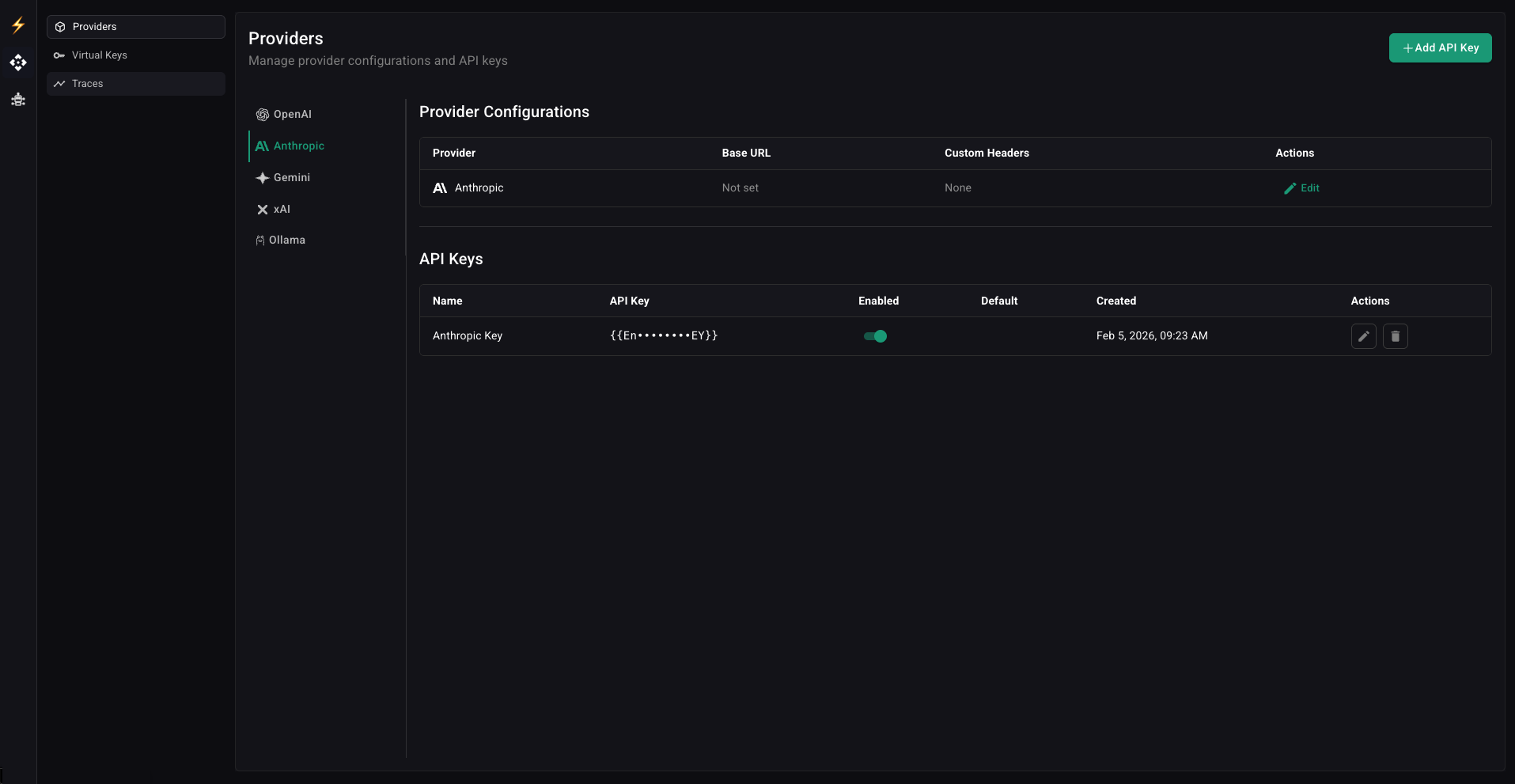
LLM Gateway Dashboard
01

Virtual Keys

Never expose provider API keys again. Generate virtual keys with fine-grained access control per provider, model, and rate limit. Distribute to teams or customers with one-click revocation.

  • Per-provider and per-model access restrictions
  • Rate limiting by requests and tokens
  • Instant key revocation
View Documentation
main.py
from openai import OpenAI

# Use your HasteKit virtual key
client = OpenAI(
    base_url="http://gateway.example.com/api/gateway/openai",
    api_key="sk-hk-abc123...",  # Virtual key
)

# Works exactly like OpenAI SDK
response = client.responses.create(
    model="gpt-4.1-mini",
    input="Hello!",
)
02

API Key Balancing

Distribute load across multiple provider API keys to maximize throughput and avoid rate limits. Configure weighted distribution, automatic failover, and key rotation.

  • Weighted round-robin distribution
  • Enable / disable API keys quickly
View Documentation
Load Balancer
OpenAI Key 1
60%
OpenAI Key 2
30%
OpenAI Key 3
10%
03

Usage Analytics & Observability

Know exactly what you're spending. Real-time dashboards show requests, tokens, and costs broken down by provider, model, and project. Full request tracing with OpenTelemetry integration.

  • Cost tracking by provider, model, and project
  • Request/response logging with ClickHouse
  • OpenTelemetry traces and metrics
  • Configurable time ranges and intervals
View Documentation
Request Activity
Requests Latency Tokens
Go SDK

Production-Ready AI Agents in Go

The only Go SDK with unified Responses API across all major providers, MCP support, agent handoffs, and durable execution via Temporal and Restate. Ship reliable agents in pure Go.

Terminal
go get -u github.com/hastekit/hastekit-sdk-go
01

Provider Abstraction

Switch between LLM providers with a single line change. The SDK provides a unified interface across OpenAI, Anthropic, Gemini, xAI, and Ollama - same code, any provider.

  • Unified Responses API across all providers
  • Automatic response normalization
  • Streaming support for all providers
View Documentation
main.go
// Switch providers by changing the model string
resp, _ := client.NewResponses(ctx, &responses.Request{
    Model: "OpenAI/gpt-4o-mini",       // OpenAI
    // Model: "Anthropic/claude-sonnet-4-5" // Anthropic
    // Model: "Gemini/gemini-2.5-flash"    // Gemini
    Input: responses.InputUnion{
        OfString: utils.Ptr("Hello!"),
    },
})
02

MCP, Tools & Sub-Agents

Equip your agents with powerful capabilities. Connect to MCP servers, define custom function tools, or compose agents together by using one agent as a tool for another.

  • Model Context Protocol (MCP) server integration
  • Type-safe function tool definitions
  • Agent-as-tool for hierarchical workflows
  • Agent handoffs for transferring control to specialised agents
View Documentation
tools.go
// Connect to MCP server
mcpClient, _ := mcpclient.NewSSEClient(ctx, 
    "http://localhost:9001/sse",
)

// Create agent with MCP + custom tools
agent := client.NewAgent(&hastekit.AgentOptions{
    Name:       "Assistant",
    LLM:        model,
    McpServers: []agents.MCPToolset{mcpClient},
    Tools:      []agents.Tool{NewWeatherTool()},
})
03

History & Summarization

Built-in conversation management that scales. Automatically track conversation history, summarize long conversations to stay within context limits, and persist state across sessions.

  • Automatic conversation tracking
  • Intelligent summarization for long contexts
  • Configurable history window
  • Pluggable storage backends
View Documentation
history.go
// Create conversation manager
history := client.NewConversationManager()

agent := client.NewAgent(&hastekit.AgentOptions{
    Name:    "Assistant",
    LLM:     model,
    History: history,  // Enable history
})

// Conversations linked by namespace + PreviousMessageID
out, _ := agent.Execute(ctx, &agents.AgentInput{
    Namespace:         "user-123",
    PreviousMessageID: lastRunID,
    Messages: []responses.InputMessageUnion{
        responses.UserMessage("What's my name?"),
    },
})
04

Durable Execution

Build agents that survive failures. Integrate with Temporal or Restate for crash recovery, automatic retries, and long-running workflows that can span hours or even days.

  • Temporal workflow integration
  • Restate durable execution support
  • Automatic state persistence
  • Resume from any failure point
View Documentation
durable.go
// Initialize SDK with Restate
client, _ := hastekit.New(&hastekit.ClientOptions{
    ProviderConfigs: providerConfigs,
    RestateConfig: hastekit.RestateConfig{
        Endpoint: "http://localhost:8081",
    },
})

// Create durable agent - survives crashes
agent := client.NewRestateAgent(&hastekit.AgentOptions{
    Name: "DurableAgent",
    LLM:  model,
})
05

Human in the Loop

Keep humans in control of critical decisions. Pause agent execution for approval, collect additional input, or implement review workflows before sensitive operations.

  • Tool-level approval requirements
  • Async approval workflows
View Documentation
approval.go
// Create tool that requires human approval
type DeleteTool struct {
    *agents.BaseTool
}

func NewDeleteTool() *DeleteTool {
    return &DeleteTool{
        BaseTool: &agents.BaseTool{
            RequiresApproval: true,  // Requires approval
            ToolUnion: responses.ToolUnion{...},
        },
    }
}

Unified access to every major LLM provider

OpenAI
Anthropic
Gemini
xAI
Ollama
OpenRouter
ElevenLabs
Provider Support

Full Feature Matrix

Comprehensive support across all major LLM providers and capabilities.

Provider Text Image Gen Image Proc Tool Calls Reasoning Streaming Structured Output Embeddings Speech
OpenAI
Anthropic - - -
Gemini
xAI - - - -
Ollama - - - -
Get Started

Up and Running in 60 Seconds

Start with a single command. No complex setup required.

1

Launch the Gateway

Run the HasteKit gateway with a single command. Includes both LLM gateway and Agent gateway.

Terminal
npx @hastekit/ai-gateway
2

Configure Providers

Add your LLM provider API keys through the dashboard at localhost:3000.

Add OpenAI key
Add Anthropic key
Add Gemini key
3

Create Virtual Key

Generate a virtual key with your desired permissions, rate limits, and model access.

Virtual Key
sk-hk-abc123def456...
4

Start Building

Use your existing SDK with the gateway URL, or build agents with the no-code builder.

main.py
from openai import OpenAI

client = OpenAI(
    base_url="http://localhost:6060/api/gateway/openai",
    api_key="your-virtual-key",
)

Ready to Ship AI Agents?

Start building production-grade AI agents today. Try the Gateway or explore the SDK.