
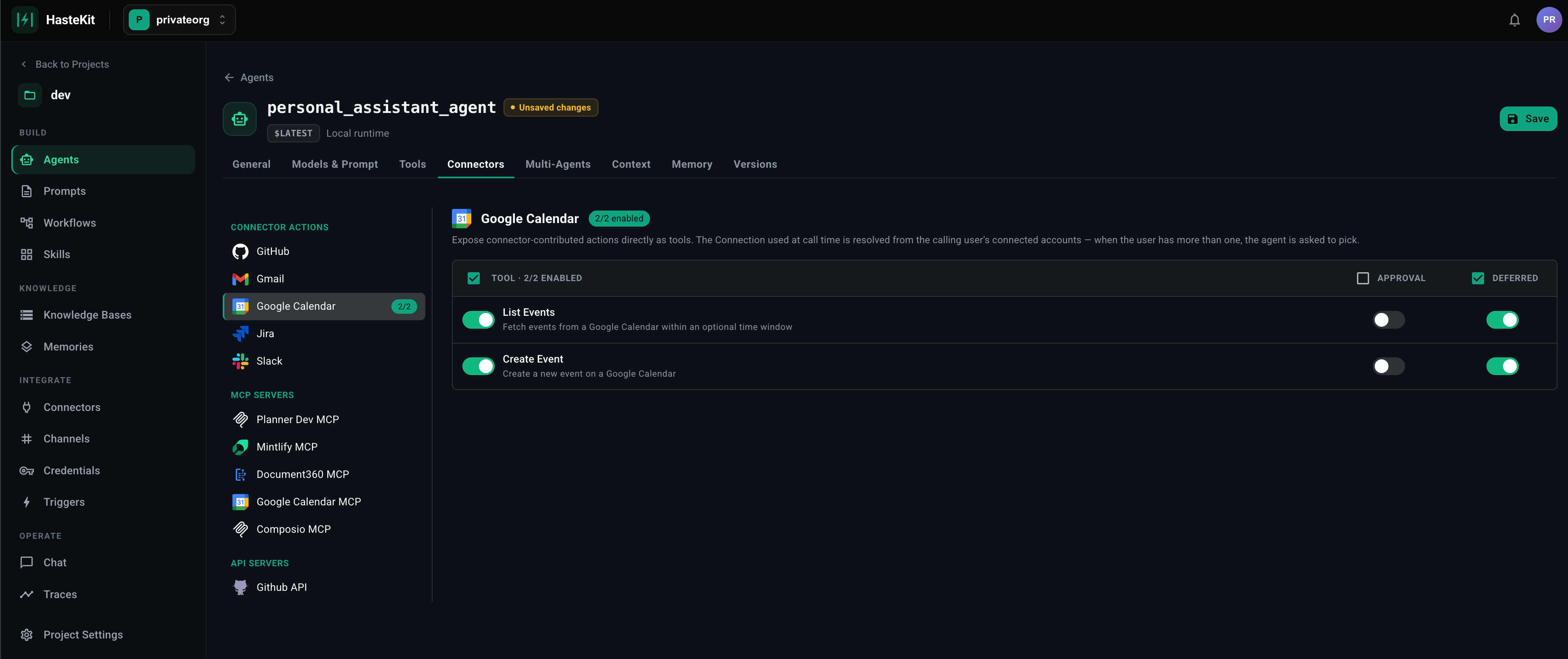
How it works
A deferred tool is registered with HasteKit but not exposed in the system prompt by default. Instead, the agent sees a single meta-tool —tool_search — that lets it discover and load tools on demand:
- The agent calls
tool_search("calendar"). - HasteKit returns a short list of matching tool names and one-line summaries.
- The agent calls
tool_load(["GoogleCalendar.CreateEvent"]). - The full schema of that tool is now in scope and the agent can call it.
Marking tools as deferred
Available on every tool type that supports filtering:- MCP Servers — Deferred Tools field (comma-separated tool names).
- API Servers — flag specific operations.
- Connectors — flag specific actions.
- Provider Tools — toggle on a per-tool basis.
When to defer a tool
- Big catalogs — anything past ~20 tools starts to crowd the prompt and degrade tool-call accuracy.
- Specialty tools — tools the agent only needs in narrow cases (e.g.
Jira.TransitionIssueis only relevant once the user mentions tickets). - Heavy schemas — tools whose input schemas are huge (deeply nested objects, long enums) cost more tokens to keep loaded.
When NOT to defer
- Always-needed tools — if the agent is going to use the tool on most runs, deferring just costs an extra round-trip every time.
- Tools the agent should consider proactively — discovery only happens when the agent thinks to search; if the right answer is “use tool X” and the agent doesn’t know X exists, it won’t find it.